
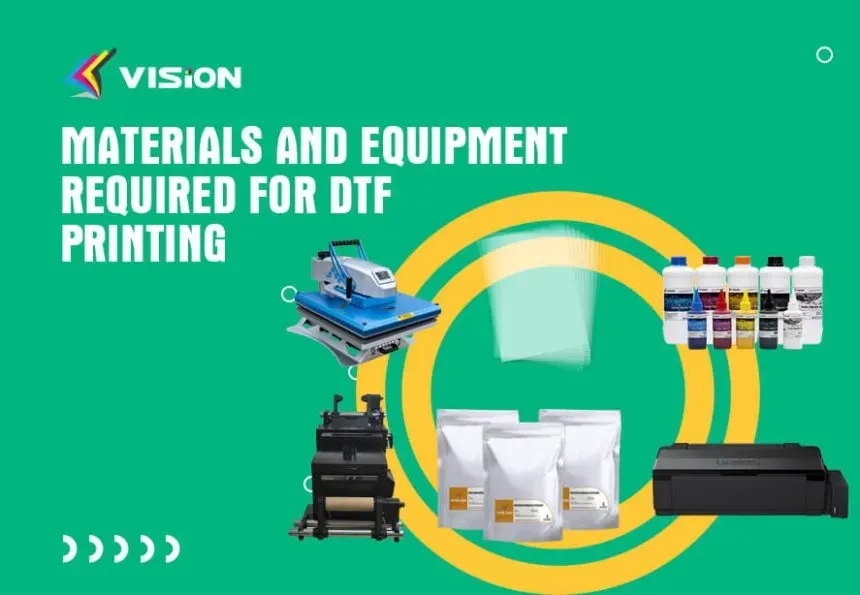
DTF printing tools and supplies form the backbone of successful decorative projects on garments and textiles. Getting off to a strong start means choosing dependable hardware and consumables that deliver repeatable results day after day. Key ingredients include DTF transfer film, a reliable heat press, and a setup to keep colors vivid and textures smooth. With the right combination, setup time shrinks, waste drops, and your process becomes easier to manage. This introductory guide walks you through the essential tools and supplies so you can start producing professional, durable prints for a growing audience.
Reframing the topic in broader language helps teams build a scalable, repeatable production pipeline for fabric decoration. Think of it as a complete digital textile printing workflow that brings the printer, media, powders, and heat application into a single, dependable process. Focus on calibration, color management, and consistent curing to minimize variability across fabrics and runs. Selecting trusted components and documenting parameters creates a repeatable system you can scale over time.
Choosing a Reliable DTF Printer Setup for Consistent Results
A reliable DTF printer setup is the backbone of predictable, repeatable prints. Focus on a configuration that supports white ink alongside color inks, compatible transfer film, and a robust powder bonding system. When your head height, damping, and ink feed are stable, you reduce downtime and misfires, turning the first print into a reliable benchmark. Small calibration tweaks—such as nozzle checks and reservoir balance—can translate into meaningful gains in color consistency and batch-to-batch repeatability.
Choosing between a dedicated DTF printer and a converted machine affects long-term maintenance and performance. A purpose-built unit often delivers optimized ink channels, better head alignment, and software compatibility that minimizes clogging. A converted printer can work, but it demands careful tuning for DTF use, including adjustable ink flow, steady temperature control, and compatible RIP software. When you align this hardware choice with a clear DTF workflow, you’ll enjoy steadier output and fewer surprises across jobs.
Optimizing DTF Ink and Color Management for Vibrant Outputs
DTF ink is the lifeblood of vibrant prints. White ink is especially critical on dark fabrics, enabling opaque designs and crisp edges. Use high-quality DTF inks to deliver sharp lines and smooth gradients, while ensuring reliable curing when paired with the right transfer film and powder. Complementary maintenance fluids keep print heads clean, reducing color shifts and prolonging head life.
Establish standardized color profiles in RIP software that match your ink set, transfer film, and fabric. Regular calibration of the printer with these profiles helps maintain consistency across batches. The DTF workflow benefits from swatch libraries and quick reference sheets so you can compare results and adjust for fabric variability without guessing.
DTF Transfer Film Quality and Adhesive Powders for Durable Transfers
DTF transfer film is the carrier that preserves image fidelity from print to garment. Look for films with uniform coating, low shrinkage, and compatibility with your adhesive powder system. Some films excel at high-resolution lines, others emphasize wash-fast durability. The right film works in concert with your DTF ink and curing process to maintain color fidelity and prevent ghosting after washing.
Adhesive powders are essential for the transfer finish. They form a micro-porous matrix that enables clean release from film to fabric when heat is applied. Choose powders that flow evenly, resist clumping, and fuse reliably under your heat-press settings. The combination of a stable film and properly chosen powder reduces halos, texture irregularities, and surface roughness on the final print.
DTF printing tools and supplies: Building Your Core Toolkit
DTF printing tools and supplies constitute your core toolkit. At minimum, plan for a reliable printer that handles white and color inks, a sturdy heat press, a consistent supply of transfer film, and properly matched adhesive powder. Include calibration tools, cleaning fluids, and spare parts to keep downtime low. The goal is a simple, repeatable setup that scales with your output as you grow.
Beyond the basics, consider the long-term value of higher-grade films, RIP profiles, and curing options. When shopping, evaluate total cost of ownership, including yield, waste, maintenance intervals, and parts availability. Buy from reputable suppliers with warranty terms and dependable technical support so your DTF workflow remains uninterrupted across projects.
Heat Press Mastery: Temperature, Time, and Pressure for Perfect Results
Heat press mastery is essential for consistent transfers. Look for a unit with precise temperature control, accurate timer functions, and a platen size that suits your typical items—from tees to hoodies. A reliable heat press should allow pre-heating, quick-lock-down, and even heat distribution to minimize edge crispness losses.
For best results, tune temperature, dwell time, and pressure to your specific film and powder. A practical starting point is around 305-320°F (150-160°C) for 10-15 seconds, adjusting for fabric type and adhesive. Use a silicone sheet or teflon cover to protect surfaces and prevent sticking. Validate consistency by pressing test swatches and logging the exact parameters for each garment type as your standard operating procedure.
DTF Workflow, Maintenance, and Quality Control for Scalable Production
DTF workflow, maintenance, and quality control form the backbone of scalable production. Document every stage from artwork preparation to post-press finishing to ensure reproducibility. A well-defined DTF workflow covers design review, printing, curing, powdering, and heat transfer, with clear parameter records for each garment category.
Quality control should be baked into every step. Run representative test prints and swatches, verify alignment and edge sharpness, and inspect for color bleed after curing. Maintain a log of maintenance tasks, monitor consumable wear, and adjust the toolkit when issues emerge. This disciplined approach turns one-off projects into repeatable processes and supports ongoing improvement.
Frequently Asked Questions
What is DTF transfer film and why is it essential in DTF printing tools and supplies?
DTF transfer film is the carrier that holds the printed image as it moves from the printer to the garment. Choose a film with stable dimensions, low shrinkage, and compatibility with your ink system and adhesive powder to ensure color fidelity and wash-fastness. When paired with proper curing and a reliable adhesive powder, the film becomes the vehicle for durable transfers across fabrics.
How do I choose the right DTF ink for vibrant color and durability in the DTF workflow?
DTF ink quality directly affects opacity, color accuracy, and wash resistance. Prioritize white ink for light fabrics and vibrant colors for dark textiles, and ensure the inks are compatible with your transfer film and powder. Use maintenance fluids to keep print heads clean and stabilize colors, and follow a consistent curing process to maximize durability within the DTF workflow.
What should I consider in DTF printer setup to ensure consistent results?
DTF printer setup includes head height, ink flow, damping, and reservoir levels. Establish a daily priming routine, perform nozzle checks, and run purge cycles to prevent head wear and banding. Ensure RIP software compatibility and stable calibration to achieve repeatable output across batches.
How can I optimize heat press settings for a reliable transfer with DTF transfer film?
Focus on precise temperature control, even pressure, and appropriate dwell time. A practical starting point is 305-320°F (150-160°C) for 10-15 seconds, but dial this in based on fabric, ink, and adhesive. Use a silicone sheet or teflon cover to protect surfaces, and pre-heat or adjust for film stability to achieve crisp transfers.
How does the DTF workflow influence color management and finishing when using DTF transfer film and adhesive powder?
The DTF workflow guides every step from design to finish. Establish standardized color profiles that match your inks, film, and fabrics, and maintain a swatch library for quick calibration. The transfer film, adhesive powder, and curing steps all interact to determine color fidelity, wash-fastness, and overall finish across batches.
What maintenance steps are essential for DTF printer setup and heat press to minimize downtime?
Regular maintenance minimizes surprises: clean print heads, flush ink lines when changing colors, and inspect the film path and silicone rollers. Keep a maintenance log and replace consumables as needed. For DTF printer setup, verify calibration routinely; for the heat press, monitor temperature accuracy and timekeeping and inspect platen wear to sustain consistent results.
| Aspect | Key Takeaway |
|---|---|
| Core hardware and compatibility},{ | Reliable DTF printer that handles white and color inks, compatible transfer films, and a stable powder bonding system; ensure tuning for steady uptime and predictable output, whether you use a dedicated DTF printer or a converted machine. |
| DTF inks and maintenance | White ink is crucial for light fabrics and vibrant, opaque designs on dark textiles; use high-quality DTF inks for sharp lines and reliable curing when paired with proper powder and film; include maintenance fluids and cleaning supplies to protect print heads and minimize color shifts. |
| Film, transfer film, and consumables | Transfer film must be uniform, clear, and compatible with your adhesive powder and ink system; choose films with stable dimensional properties, low shrinkage, and consistent coating; some films excel at high-resolution line work; others emphasize durability and wash-fastness. |
| Adhesive powders | Powders bond ink to fabrics; applied after printing; provide micro-porous matrix enabling transfer; should apply evenly, resist clumping, and fuse well under standard heat-press; correct curing helps prevent halos or rough textures. |
| The heat press | Quality heat press with reliable temperature control, accurate timekeeping, and an appropriate platen size; consider temperature range, heat distribution, pre-heat, hover, and quick lock-down; larger platen for hoodies and banners; smaller platen for detailed work; start with 305-320°F (150-160°C) for 10-15 seconds as a baseline and adjust per fabric and ink. |
| Color management and workflow optimization | RIP software and printer calibration translate on-screen artwork into real-world color; establish standardized color profiles matched to ink set, film, and fabric; build swatch libraries for common garments and colors; maintain a consistent design-to-transfer workflow. |
| Maintenance, troubleshooting, and quality control | Regularly clean print heads, flush ink lines when changing colors, inspect film path for dust; clean silicone rollers; keep a maintenance log and replace worn consumables; perform test prints and swatches to verify alignment, color fidelity, and edge sharpness; inspect cured transfers for color bleed or ghosting and adjust ink/film/powder/heat settings as needed. |
| Practical buying guide and budget considerations | Start with essentials: a reliable printer that supports white and color inks, a stable heat press, and a dependable supply chain for transfer film and adhesive powder; plan upgrades as you gain experience; consider total cost of ownership, including yield, waste, maintenance, and replacement parts; buy from reputable suppliers with clear warranty terms. |
| Practical tips for beginners | Start small for a consistent setup; print test swatches on fabrics similar to your customer base; maintain a dedicated workspace to reduce dust; keep a simple workflow chart with parameters; build a glossary for your team. |
| End-to-end workflow for a typical job | Prepare the artwork and convert to the correct color profile; print on DTF transfer film using white ink first, then color inks; allow the print to dry and apply adhesive powder evenly; heat-set the film to fix the powder; press the garment at the recommended temperature, time, and pressure; peel the film at the appropriate stage (hot or cold peel) for your film; inspect the finished print and apply finishing touches. |
Summary
DTF printing tools and supplies form the backbone of a reliable workflow, guiding every decision from equipment choice to the finished garment. A thoughtful, repeatable setup reduces downtime, improves color accuracy, and scales your production for growing demand. By aligning printers, inks, films, powders, heat presses, and software into a cohesive process, you can deliver crisp, durable designs across a range of fabrics. Keep maintenance and quality control at the center of your operation, and treat the checklist as a living guide that evolves with new materials, technologies, and techniques.