
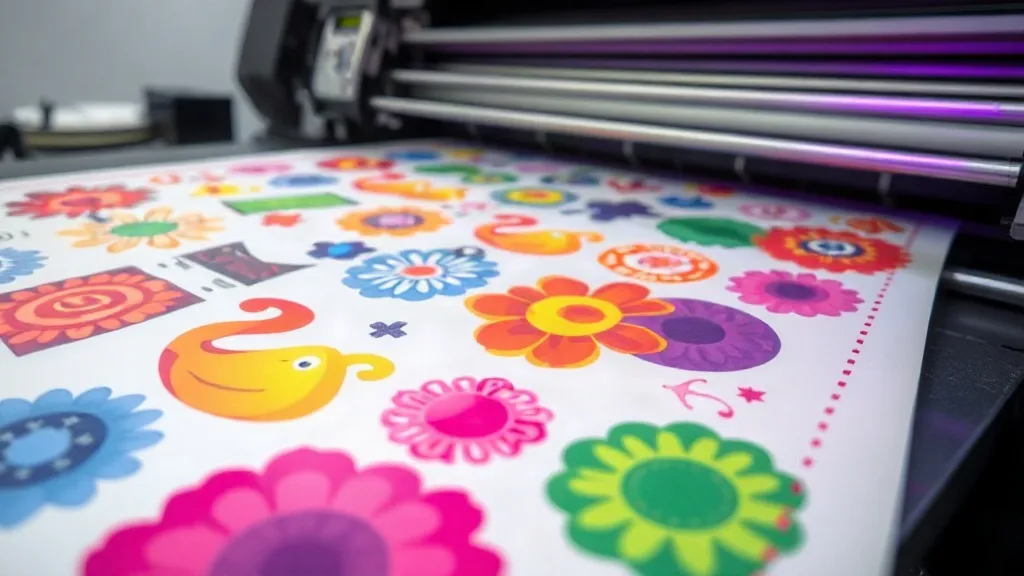
Color is the first thing customers notice about a printed shirt. A design that looked brilliant on screen can turn dull, muddy, or completely off-brand once it hits fabric. For print shops, that gap between digital promise and physical result is a constant source of frustration, reprints, and lost trust. What if you could close that gap and guarantee color consistency on every order? That is exactly where the DTF Gangsheet becomes a game-changer. By grouping multiple designs onto a single film, you not only save material but also create a controlled environment where color variables shrink and predictability rises. In this guide, we will explore how gangsheets influence color accuracy, the common pitfalls that throw colors off, and the practical steps you can take to make every print match your client's expectations.
Why Color Accuracy Matters in DTF Printing
Direct-to-film (DTF) printing has exploded in popularity because it works on almost any fabric, from cotton to polyester and blends. But unlike screen printing, where each color is mixed and applied separately, DTF relies on a digital printer to lay down CMYK plus white ink onto a film, which is then transferred via heat press. This digital process introduces its own set of color challenges. Ink viscosity, film quality, printer calibration, and even humidity can affect how colors appear. When you print a single design on a small sheet, you might not notice slight variations. But when you produce a DTF Gangsheet with dozens of different designs, any inconsistency becomes glaringly obvious. Customers expect the red in their logo to match the red on their website, and the navy in their team jersey to be uniform across all sizes. Color accuracy is not just a nice-to-have; it is a brand promise.
How DTF Gangsheets Improve Color Consistency
At first glance, a gangsheet is simply a way to save film by nesting multiple designs together. But its impact on color goes deeper. When you print several designs on the same sheet, they all go through the printer in one pass, under identical conditions. That means the same ink batch, the same environmental factors, and the same printer settings apply to every design on that sheet. This uniformity reduces the risk of variation between individual prints. If you were to print each design separately over the course of a day, changes in temperature, ink levels, or even printer head alignment could cause subtle shifts. A gangsheet locks in a moment of consistency, ensuring that all transfers produced from that sheet share the same color profile. For orders that require multiple identical prints, such as team uniforms or event merchandise, this consistency is invaluable.
The Role of Color Management in Gangsheet Production
Even with the inherent benefits of gangsheets, achieving flawless color requires a solid color management workflow. Here are the key elements to control:
- ICC Profiles: Custom ICC profiles for your printer, ink, and film combination are essential. They tell your software how to translate digital colors into ink output accurately. Without them, you are guessing.
- RIP Software: A good raster image processor (RIP) allows you to fine-tune ink limits, halftone settings, and color adjustments per job. It also helps you nest designs efficiently on a gangsheet without compromising color.
- Printer Calibration: Regular calibration of print heads, paper feed, and color sensors ensures that your printer performs consistently. Skipping calibration is like driving with a misaligned steering wheel.
- Ink and Film Quality: Using reputable inks and films from the same batch reduces variables. Cheap alternatives may save money upfront but cost you in reprints and unhappy customers.
When these elements are in place, a DTF Gangsheet becomes a reliable vehicle for color reproduction, not a source of surprises.
Common Color Issues in Gangsheet Printing and How to Fix Them
Even seasoned printers encounter color problems. Here are some of the most frequent issues and their solutions:
1. Colors Appear Dull or Washed Out
This often happens when the white ink layer is too thin or improperly cured. Ensure that your white ink settings are correct for the film you are using, and check that the heat press temperature and pressure are adequate. Also, verify that your ICC profile is not overcompensating for ink limits.
2. Color Shifts Between Prints on the Same Sheet
If you notice variation across a single gangsheet, it could be due to clogged nozzles or inconsistent ink flow. Run a nozzle check before printing, and make sure the printer has been idle for a sufficient time to stabilize. Sometimes, simply reordering the designs on the sheet can help if certain colors are more sensitive.
3. Colors Look Different After Transfer
The heat transfer process can alter colors, especially if the press is too hot or the dwell time is too long. Always test with a small sample and adjust your press settings accordingly. Remember that different fabrics absorb ink differently, so what works on 100% cotton may need tweaking for polyester.
4. Metallic or Fluorescent Colors Are Off
Specialty colors are harder to reproduce with CMYK. For critical brand colors, consider using spot color simulation or dedicated inks if your printer supports them. Otherwise, manage expectations with your client and provide a proof.
Best Practices for Designing Gangsheets with Color in Mind
Design choices significantly impact color outcome. Here are some tips to keep colors accurate:
- Use Vector Art When Possible: Vector files scale without loss of quality and produce cleaner edges, which helps colors appear more solid.
- Group Similar Colors: When nesting designs, place those with similar color palettes near each other. This can reduce ink switching and improve consistency.
- Avoid Overlapping Transparencies: Transparent elements can cause unexpected color blends when printed. Flatten transparencies before exporting to your RIP.
- Include a Color Bar: Add a small color bar or control strip on the edge of your gangsheet. This allows you to visually verify color accuracy and spot issues early.
- Test on Actual Fabric: Always do a test transfer on the fabric you will use for the final product. Colors can shift based on fabric composition and color.
These practices not only improve color but also streamline your workflow, making your DTF Gangsheet production more efficient.
Streamlining Your Workflow with Gangsheets
Beyond color, gangsheets offer operational benefits that indirectly support color consistency. By batching orders, you reduce the number of printer setups and cleanings, which minimizes the chance of color drift between jobs. You also save on film and ink, lowering costs that can be reinvested in better color management tools. Moreover, a well-organized gangsheet reduces human error: fewer manual steps mean fewer opportunities to misload film or apply the wrong settings. At DTF Studio Pro, we have seen shops transform their color reliability simply by adopting a gangsheet-first approach and sticking to a disciplined workflow.
Frequently Asked Questions
How does a DTF gangsheet help with color matching for repeat orders?
When you print a gangsheet, all designs on that sheet share the same ink batch and printing conditions. For repeat orders, you can save the gangsheet file and reuse it, ensuring that the color output remains consistent across different runs, provided your printer is calibrated and using the same materials.
Can I mix different fabric types on one gangsheet without color issues?
Yes, you can mix designs intended for different fabrics on a single gangsheet, but be aware that the transfer process may require different press settings for each fabric. The colors on the film will be consistent, but the final appearance on the fabric may vary. Always test press settings for each fabric type.
What is the best way to handle Pantone colors in DTF printing?
DTF printing uses CMYK+W, so exact Pantone matching is not possible without special inks. However, you can get very close by using a accurate ICC profile and soft-proofing in your design software. For critical brand colors, consider creating a custom ICC profile or using a spot color replacement chart.
How often should I calibrate my printer for consistent gangsheet colors?
Calibrate your printer at least once a week, or whenever you change ink batches, film rolls, or notice color drift. Regular calibration is key to maintaining color accuracy, especially for gangsheet production where consistency across many designs is crucial.
Can I use a gangsheet for small batches of different designs?
Absolutely. Gangsheets are ideal for small batches because they let you combine multiple designs into one print run, saving time and materials. Just ensure that the designs are properly nested and that you have enough space for a color bar to monitor output.
Color accuracy is not a luxury; it is a necessity for print shops that want to build a reputation for quality. By leveraging the DTF Gangsheet approach and implementing rigorous color management, you can deliver transfers that consistently meet and exceed expectations. Start with a single gangsheet today, and see the difference it makes in your customer satisfaction and your bottom line.